
Calibration
Your notebook brings its own devices — a built-in webcam, a docking station, a network adapter. Those devices travel with you and must never end up being linked to a workstation. Calibrate the sensor once before you plug into the first workstation, and every pairing after that stays clean.
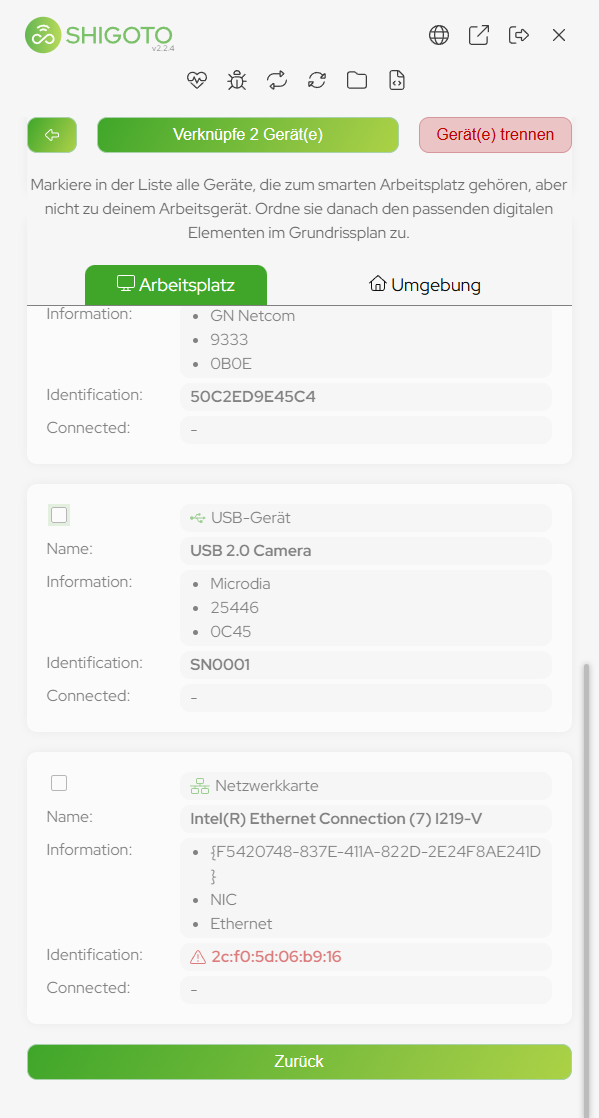
Calibrate before the first pairing
- Disconnect your notebook from any workstation, dock or hub.
- Open the Shigoto Sensor and click Link Workstation to show the device list.
- Deselect every device that is visible. Whatever the sensor detects at this point belongs to your notebook, not to a physical workstation.
- Leave the list without linking anything. The calibration is done.
What the sensor remembers
- Every device you deselect by hand is remembered by the sensor.
- Remembered devices stay deselected the next time they appear — you do not have to repeat the calibration at each workstation.
- Notice a device showing up at several workstations? Deselect it once, and it is excluded from all future pairings as well.
Never link the devices of your own notebook
Devices that belong to your notebook move with you from workstation to workstation. Once they are linked, the sensor recognizes you instead of the workstation, and every workstation you visit reports the same devices. The result is a mess of wrong occupancies that has to be unlinked workstation by workstation.
Checklist
- Notebook disconnected from all workstations
- Device list opened once
- All visible devices deselected
- No device linked during the calibration