
Already Paired?
Sometimes a device in the list is marked as already paired: its Connected field names a workstation instead of showing a dash.
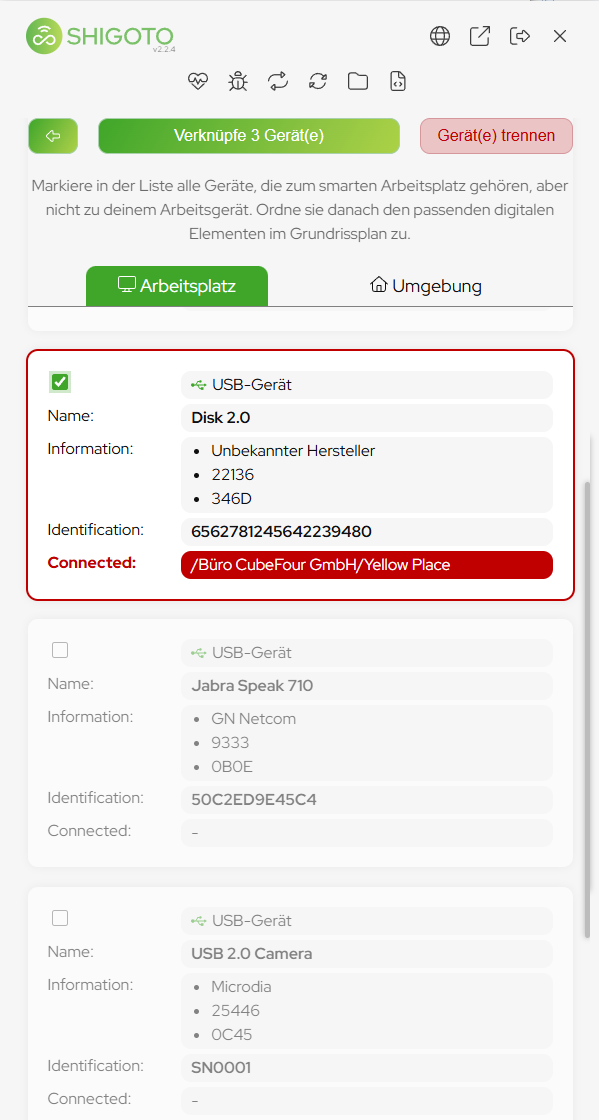
Two possible causes
- You already captured this physical workstation — under a different name, or in an earlier pass through the building.
- Two devices share the same serial number. The sensor cannot tell them apart and treats them as one device. Batches of identical monitors are the usual source; it happens rarely, but it happens.
What to do
- Check whether the named workstation is the one you are actually sitting at. If it is, there is nothing to do — it is already linked.
- Any other workstation means two devices share a serial number. That cannot be repaired: the sensor has no way to tell the two apart.
- Select the device and click Unpair to drop the existing link.
- Deselect the device permanently, so it is excluded from every future pairing.
- Pair the workstation with the remaining devices.
A duplicate serial number holds exactly one assignment
Identical serial numbers look like a single device, and a single device can belong to a single workstation. Pair it without unpairing first and the newest assignment simply wins — every user at any of those workstations is then reported as sitting at that one place.